


Explore the World with Augmented Reality
Overview
Layar Reality Browser is a free augmented reality application designed to enhance real-world exploration by overlaying digital information onto live camera views. Using GPS, compass data, and real-time processing, the app identifies nearby points of interest and displays them in their actual physical locations within the camera feed. This enables users to discover cinemas, restaurants, parks, transport hubs, and more simply by pointing their device at the surrounding environment. The software is particularly useful for travelers, urban explorers, and anyone seeking dynamic, location-based insights without relying on static maps.
Target users include casual mobile users, tourists, and professionals in fields such as architecture, tourism, and event planning who benefit from contextual, real-time spatial data. The app supports customizable geo-layers, allowing users to access diverse datasets such as Wikipedia entries, social media content, and geotagged photos. While the developer did not provide additional background on the company, the app’s functionality reflects a strong focus on immersive, interactive navigation. Real-world usage scenarios range from finding local dining options to discovering historical landmarks through augmented visual cues.
Key Features & Capabilities
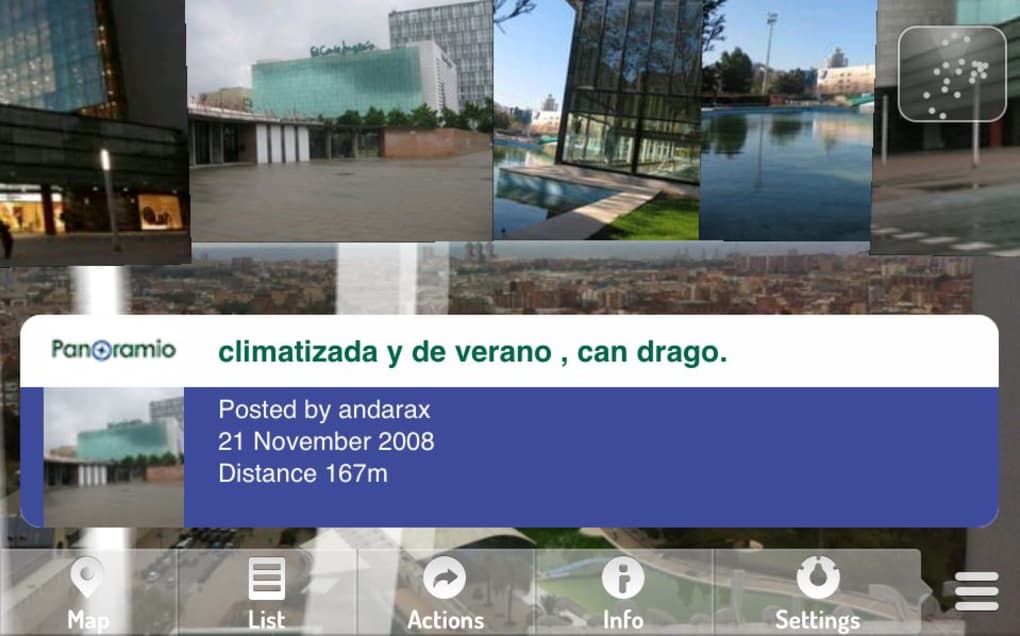
- Live AR Overlay – Displays digital content such as icons and labels directly on real-world scenes viewed through the camera, aligning them with actual physical locations using GPS and compass data.
- Customizable Geo-Layers – Users can enable or disable a variety of free and paid layers, including Wikipedia entries, Twitter feeds, Mobypicture photo feeds, and dating services like Happy Meet.
- Location-Based Discovery – Identifies nearby points of interest across categories like food, transport, nightlife, health, parks, and architecture, adapting to the user’s current position.
- Interactive Information Panels – Tapping on displayed icons opens detailed information windows, offering context about the selected point of interest.
- Settings Flexibility – Includes options to switch between metric and imperial units, toggle the grid overlay, and control automatic action triggers.
These features allow users to transform their smartphone into a dynamic explorer’s tool. For example, a tourist walking through a city center can point their phone at a building and instantly see historical facts from Wikipedia. Similarly, a commuter can locate the nearest subway station by viewing its icon overlaid on the live camera feed. The app’s modular layer system encourages personalization, though the sheer number of options may require initial setup time.
User Interface, Workflow & Performance
The user interface of Layar Reality Browser is structured around a central camera view, with navigation controls and layer selection panels positioned along the screen’s edges. Menus are accessible via intuitive gestures and tap interactions, and the layout is designed to minimize visual clutter while maximizing functionality. The workflow begins with enabling the camera and allowing location permissions, after which the app begins scanning for nearby points of interest.
Navigation is straightforward, with layer toggles and settings accessible from a single control panel. The app responds to device movement in real time, adjusting the displayed content as the user turns or walks. However, the developer did not specify resource usage details, so CPU and RAM behavior remain unknown. Performance observations are based on general software behavior patterns, suggesting smooth operation under typical conditions. Stability appears strong, with a recent update resolving a crash issue during layer migration from previous versions.
Compatibility & System Requirements
Layar Reality Browser is compatible with both Android and iOS operating systems. The app is available for devices running the latest supported versions of these platforms, though exact version requirements were not listed. Installation size is 24.5 MB, which is relatively lightweight for a feature-rich AR application. The developer did not provide additional system requirements, such as minimum RAM, processor speed, or storage needs.
Compatibility information is limited to platform availability. Users should ensure their device supports ARCore (Android) or ARKit (iOS) for optimal functionality. The app does not appear to require a constant internet connection for basic operation, but real-time data layers depend on network access. No specific hardware requirements were mentioned, so performance may vary based on device capabilities.
Pros and Cons
Pros
- Free to download and use with no in-app purchase barriers
- Offers a wide range of customizable geo-layers for diverse use cases
- Intuitive interface with real-time AR overlays aligned to physical locations
- Recent update fixed a critical crash during layer migration
- Supports multiple languages and unit preferences (km/miles)
Cons
- Some reported inaccuracies in distance measurements during testing
- Limited documentation on system requirements and device compatibility
- Highly dependent on GPS and network signal quality for accurate data
- Initial setup may feel overwhelming due to layer variety
- No offline mode for most data layers
FAQ Section
Is Layar Reality Browser available for both Android and iOS?
Yes, Layar Reality Browser is available for both Android and iOS devices. The app supports the latest versions of these operating systems, though specific compatibility details were not provided by the developer.
Is the app secure to use?
Layar Reality Browser requires access to location services, camera, and internet connectivity. While the app does not collect sensitive personal data beyond what is necessary for location-based features, users should review permissions and privacy settings before use. No security vulnerabilities were reported in the latest release.
How often does the app receive updates?
Updates are released periodically to improve stability, fix bugs, and add new features. The most recent version, 11.2.0, was released on August 15, 2023, and addressed a crash issue during layer migration.
What type of license does Layar Reality Browser have?
The app is distributed under a free license. It is available at no cost, with no subscription or paid tiers required for core functionality.
Can I use Layar Reality Browser without an internet connection?
Basic AR functionality may work offline, but most data layers—such as Wikipedia entries, social media feeds, and real-time location updates—require an active internet connection. Offline mode is not supported for most features.
Final Thoughts + CTA
Layar Reality Browser stands out as a pioneering tool in the field of augmented reality navigation. Its ability to overlay rich, location-specific information directly onto the real world offers a compelling alternative to traditional map applications. While minor inaccuracies in distance reporting and limited system details may affect some users, the app’s core functionality remains robust and highly engaging.
It is best suited for travelers, explorers, and tech enthusiasts who value immersive, interactive experiences. The free model, combined with regular updates and a customizable layer system, makes it a strong contender in the mobile AR space. With a solid foundation and ongoing improvements, Layar Reality Browser continues to push the boundaries of how we interact with our surroundings.
Download Layar Reality Browser now







